
Android System WebView Canary
Screenshots
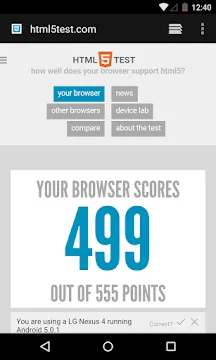

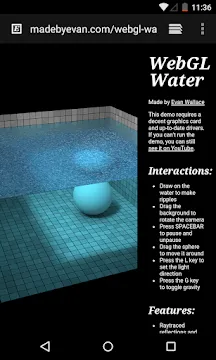

Android System WebView Canary is a bleeding-edge system component that allows mobile applications to display web content directly. This specific software version acts as an experimental developer preview platform for testing the newest mobile features. Users can experience real-time updates and experimental tools that enhance the overall internal browsing environment.
The development team updates this system component frequently to introduce advanced web technologies and critical performance patches. Consequently, tech enthusiasts can explore new rendering engines before they arrive on standard consumer mobile devices. The application functions independently alongside the stable version to prevent any disruption to your regular device operations.
Understanding the Core Architecture
Mobile operating systems require specific tools to render web pages smoothly inside regular applications. Therefore, this component provides the underlying engine that powers internal browsers for social media tools and shopping apps. Developers rely on this framework to build cohesive user experiences without forcing users to open external web browsers.
The Canary variant represents the most experimental tier of this technology stack. As a result, it receives daily updates containing the newest code modifications from the development team. This fast update cycle allows users to witness live improvements in rendering speed and compatibility features.
Android System WebView Canary Main Benefits for Daily Performance
Enhanced speed remains a primary goal for this experimental system tool. In other words, the application optimizes how your device processes JavaScript and complex CSS styles. This optimization leads to faster loading times when you open web articles inside your favorite news applications.
Moreover, the tool introduces advanced memory management techniques to reduce system resource consumption. Mobile devices often struggle when loading heavy web elements within standard applications. However, this component mitigates those issues by allocating RAM more efficiently during active browsing sessions.
Understanding Technical Requirements and Compatibility
System components must match your device operating version to perform effectively. Therefore, the development team designs this application to run on recent software updates smoothly. Users should ensure their operating system meets the minimum generation criteria before activating the experimental engine.
In addition, the tool supports both sixty-four-bit and thirty-two-bit hardware processing architectures. This broad compatibility ensures that multiple types of mobile devices can run the experimental framework without difficulty. Consequently, you can experience advanced features regardless of your specific hardware choice.
Key Features of Android System WebView Canary
This experimental system tool contains several unique capabilities designed for developers and power users. For example, it offers access to deep developer flags that modify how web scripts behave on your device. Users can toggle these experimental settings to customize their rendering preferences.
In addition, the software provides tools that track performance metrics across different application sessions. These tools help identify stability problems before they affect the general public. Let us explore the specific capabilities of this advanced mobile utility.
Experimental Developer Flags
Users can access a hidden menu filled with hundreds of experimental developer flags. These flags allow you to enable or disable upcoming web platform features manually. Consequently, you gain complete control over how the engine handles modern web protocols.
Moreover, changing these flags helps you test new technologies before they become standard. You can discover hidden features that speed up text rendering and graphic processing. Therefore, this option provides an excellent playground for advanced users.
Daily Update Stream
The development team pushes fresh updates to this application almost every single day. These updates include the latest patches, security fixes, and experimental features directly from the code source. Therefore, you will always stay ahead of the standard release timeline.
In addition, the frequent updates guarantee that you receive immediate solutions for newly discovered software bugs. You can observe the evolution of web technologies in real time. As a result, this stream keeps your rendering engine highly modern.
Side-by-Side Installation
This utility installs as a separate package on your mobile device storage system. It does not replace your existing stable web rendering component. As a result, you can switch between different versions without breaking your daily applications.
Furthermore, this independent setup prevents any catastrophic system crashes from affecting your core device functions. If the experimental build fails, your device automatically defaults to the stable build. In other words, you enjoy maximum safety while testing advanced features.
Advanced Crash Reporting
The software includes automated diagnostic tools that log unexpected application closures and rendering errors. These tools send detailed technical reports back to the engineering team. Subsequently, developers can fix bugs much faster during the testing cycle.
Moreover, users can view these logs to identify which specific web pages caused the instability. This transparency helps you manage your browsing habits inside experimental apps. Consequently, you contribute actively to the improvement of the overall platform.
Modern JavaScript Engine
This component integrates the latest version of the V8 JavaScript execution engine. The updated engine handles complex web applications and interactive scripts with incredible efficiency. Thus, users experience fewer stutters when interacting with modern web layouts.
In addition, the engine improves the execution speed of web games and animated interfaces. Heavy web scripts compile much faster under this framework. Therefore, you get a smoother experience inside apps that fetch web data constantly.
Enhanced Graphics Acceleration
The program utilizes your mobile device hardware graphics processor to render visual elements smoothly. This hardware acceleration improves the playback quality of web-based animations and visual effects. Furthermore, it reduces the overall strain on your main central processing unit.
As a result, your device battery lasts longer during heavy browsing sessions. The graphics chip handles complex visual layers with minimal power draw. In short, this feature provides a highly efficient visual environment.
How to Download and Install Android System WebView Canary
You can acquire this experimental tool easily by following a few straightforward steps on your mobile device. First, you must locate a trusted mobile software repository that hosts the genuine application file. Click the download button to save the installation file directly onto your local device storage. Afterward, you can execute the setup process manually by using the simple guide provided below.
- Find the downloaded file in your device storage manager application.
- Select the file to initiate the manual installation sequence.
- Approve the necessary storage permissions if your device prompts you.
- Wait for the installation progress bar to reach completion.
- Open your main device settings menu to configure the new component.
- Navigate to the developer options tab to select your active web provider.
- Choose the Canary option to activate the experimental rendering engine.
Android System WebView Canary Tips and Tricks
- Enable the developer options menu on your device to unlock hidden web management settings immediately.
- Check the experimental flags menu regularly to find new performance boosting toggles for web scripts.
- Update the application every morning to receive the latest stability patches and features without delay.
- Use the built-in diagnostic tools to monitor exactly how much RAM web pages consume during use.
- Keep the stable version installed as a backup option if an update causes unexpected stability issues.
- Report persistent rendering bugs through the official feedback tool to help the engineering team improve code.
Conclusion
This experimental system tool provides an excellent way to preview the future of mobile web rendering technology. It gives tech enthusiasts and developers early access to powerful tools and optimizations. Although it receives daily updates, it maintains a safe distance from your critical system files.
In short, downloading this software allows you to stay at the absolute forefront of mobile development. You can enjoy faster web loading speeds and explore unique hidden features today. Install the component now to upgrade your mobile application browsing capabilities.